 Thrum
WindowServer high CPU on a Mac: causes and fixes
Last checked: October 2026 on macOS 26 Tahoe.
WindowServer is the macOS process that draws everything you see: it combines every app's windows, the menu bar, the Dock and the desktop into the picture sent to each display. High WindowServer CPU almost always means something is asking it to redraw a lot, such as several or high-resolution displays, many open windows, transparency and animation effects, or an app that redraws constantly. Reducing that work brings it down; quitting WindowServer only logs you out.
Check how much CPU WindowServer uses
- Open Activity Monitor (Applications > Utilities).
- Click CPU, choose View > All Processes, and click the % CPU column.
- Find WindowServer in the list. You can type its name in the search field at the top right.
WindowServer using some CPU while you move windows, scroll or watch video is normal; it rises and falls with what is on screen. It is worth fixing when it stays high while you are not doing anything on screen.
Common causes
- External and high-resolution displays. Each display adds pixels to draw. Scaled resolutions (the "More Space" options in System Settings > Displays) make the Mac draw at a higher resolution and scale down, which costs more.
- Many open windows, especially across several desktops, and many browser windows.
- Transparency and motion effects in menus, sidebars, the Dock and the menu bar.
- An app that redraws constantly, for example a web page with animations or ads, a video, a game, or a menu bar app that updates many times a second.
- Screen recording and screen sharing, which make WindowServer capture the screen as well as draw it.
How to bring WindowServer CPU down
- Find the app causing the redraws. In Activity Monitor, sort by % CPU and look at what is busy alongside WindowServer. Quit or close windows in that app and watch whether WindowServer drops.
- Close windows and tabs you are not using. Minimized windows and windows on other desktops still count.
- Reduce transparency. Open System Settings > Accessibility > Display and turn on Reduce transparency. Turning on Reduce motion on the same page removes some animations.
- Try the default display resolution. In System Settings > Displays, choose the default size for each display instead of a "More Space" setting, and see whether WindowServer's CPU falls.
- Disconnect a display to test. If CPU drops a lot, that display's resolution or refresh rate is part of the cause.
- Log out and back in, or restart. This starts a fresh WindowServer.
These settings are in the same places in macOS 26 Tahoe, macOS 15 Sequoia and macOS 14 Sonoma.
Can you quit WindowServer?
Not without losing your session. Force quitting WindowServer logs you out at once, closing every app without saving. Activity Monitor warns about this before it does it. Use log out or restart instead, which give apps a chance to save.
See what is busy alongside WindowServer with Thrum
Thrum keeps a live CPU graph in the menu bar and lists the eight processes using the most CPU, including WindowServer and other processes owned by the system, with app icons. When WindowServer climbs, the app causing it is usually right next to it in the list.
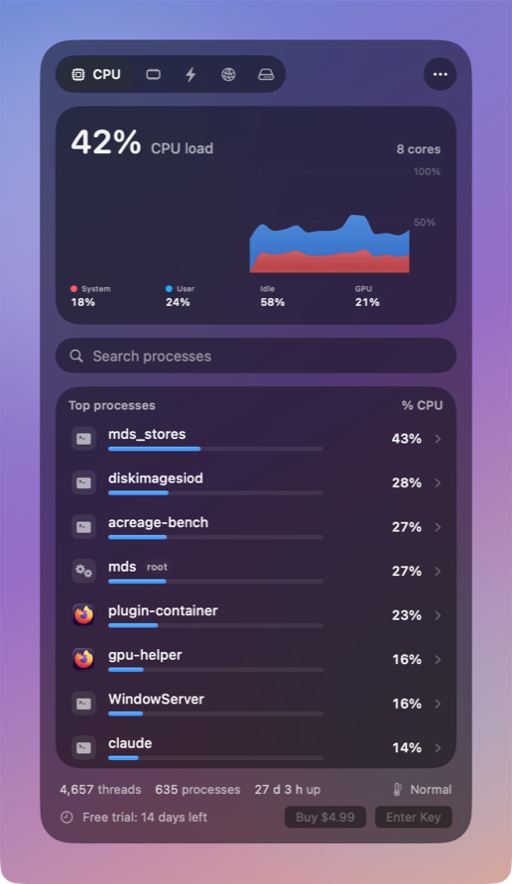
- The CPU tab also shows GPU use for the whole Mac, which rises with heavy drawing.
- Thrum never offers Quit for WindowServer, the kernel, launchd or loginwindow, so it cannot log you out by accident.
- Thrum's own menu bar graph updates at most every 2 seconds with the popover closed. On a MacBook Pro (M1 Pro) it measured 0.3% CPU that way.
Thrum is $4.99 once, with a 14-day free trial and no account. After the trial the menu bar graph and the popover keep working; Quit, Force Quit and alerts need a license. It requires macOS 26 Tahoe, on Apple silicon or Intel.
Questions
Is WindowServer a virus?
No. WindowServer is part of macOS and runs on every Mac while someone is logged in.
Why does WindowServer use more CPU with an external display?
It has more pixels to draw, and scaled resolutions make it draw at a higher resolution and scale down. Try the display's default resolution.
Does Reduce transparency help WindowServer?
It removes blur effects that WindowServer has to compute for menus, sidebars and the Dock, which can lower its CPU use. The difference depends on the Mac and the displays.