 Thrum
How to see which app is using energy and draining your Mac battery
Last checked: October 2026 on macOS 26 Tahoe.
To see which app is draining a Mac's battery, click the battery icon in the menu bar: apps listed under Using Significant Energy are the heavy ones right now. For numbers, open Activity Monitor, click the Energy tab and sort by Energy Impact (now) or 12 hr Power (the last 12 hours). Quitting the apps at the top of either list is the quickest way to make the battery last longer.
1. The battery menu
On a Mac laptop, click the battery icon in the menu bar. If any app is using a lot of energy, it appears under Using Significant Energy; otherwise the menu says No Apps Using Significant Energy.
The list shows only apps macOS considers heavy, with no numbers, and only on Macs with a battery. If the battery icon is hidden, turn it on in System Settings > Control Center, under Battery.
2. Activity Monitor's Energy tab
- Open Activity Monitor (Applications > Utilities, or press Command-Space and type Activity Monitor).
- Click Energy at the top of the window.
- Click Energy Impact to see what is using the most energy right now, or 12 hr Power to see what used the most over the last 12 hours (or since the Mac started, if that is shorter).
- To quit an app, select it and click the Stop button (the X in the toolbar), then choose Quit.
Other columns worth a look:
- Preventing Sleep: Yes means the app is keeping the Mac awake. Video players, downloads and some background tools do this.
- App Nap: Yes means macOS is slowing the app down while it is out of sight, to save energy.
- Requires High Perf GPU: on Macs with two graphics processors, Yes means the app keeps the more power-hungry one switched on.
On a laptop, the bottom of the Energy tab shows the remaining charge, a battery graph and, when on battery, the time remaining. The Energy tab is the same in macOS 26 Tahoe, macOS 15 Sequoia and macOS 14 Sonoma.
What Energy Impact means
Energy Impact is a relative score, lower is better. macOS calculates it from how much CPU an app uses, how often it wakes the CPU from idle, and how much it reads from and writes to disk, among other things. An app using one CPU core fully scores roughly 100. It is not a measurement in watts, but apps with higher scores drain the battery faster.
3. Battery settings
Open System Settings > Battery. The charts show the battery level and the Mac's energy usage or screen-on usage over the last 24 hours and the last 10 days. They cover the whole Mac, not single apps, but they show when the drain happened, which you can match to what you were doing. In the same place, Low Power energy mode reduces energy use to make the battery last longer.
4. Terminal
To list what is keeping the Mac awake:
pmset -g assertionsThe section "Listed by owning process" names each process and the reason. To list processes by their power score, run top -o power and press q to quit.
Common battery drains
- Web browsers with many tabs, especially pages playing video or animations.
- Video calls, screen sharing and screen recording.
- Spotlight indexing, Photos analysis and backups after a large change or a macOS update. These stop by themselves.
- Apps that keep the Mac awake (Preventing Sleep: Yes).
- High display brightness and external displays.
Energy impact per app with Thrum
Thrum's Energy tab shows energy impact per app, calculated the way macOS does from CPU time, idle wake-ups and disk activity, with a 60-second graph and up to eight apps currently using energy. It also shows the battery level, time remaining and power source. The menu bar graph is always there, so a busy app is easy to spot before the battery runs down.
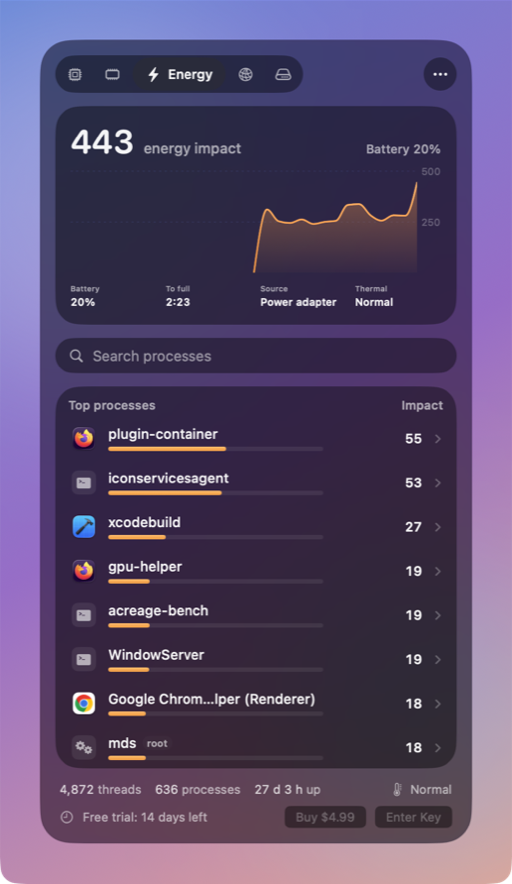
- Click an app for its PID, threads, CPU time and idle wake-ups, and to Quit or Force Quit it after a confirmation.
- For processes owned by root, macOS shares only CPU time and memory, so Thrum's energy figure for them is based on CPU time.
- An optional alert notifies you when an app stays busy for a few minutes. Alerts are off until you turn them on.
Thrum is $4.99 once, with a 14-day free trial and no account. After the trial the menu bar graph and the popover keep working; Quit, Force Quit and alerts need a license. It requires macOS 26 Tahoe, on Apple silicon or Intel.
Questions
What is a high Energy Impact on a Mac?
It is a relative score. An app using one CPU core fully scores roughly 100. Apps that stay well above the others while you are not using them are the ones to quit.
Why is my MacBook battery draining while it sleeps?
Something may be waking it or keeping it awake. Run pmset -g assertions in Terminal to see which processes are preventing sleep.
Does Activity Monitor show energy use on a desktop Mac?
Yes. The Energy tab works on every Mac. The battery details at the bottom appear only on Macs with a battery.