 Thrum
What is memory pressure on a Mac, and how to check it
Last checked: October 2026 on macOS 26 Tahoe.
Memory pressure is macOS's own measure of how hard it is working to find free memory for apps. You can see it in Activity Monitor: open the Memory tab and look at the Memory Pressure graph at the bottom of the window. Green means memory is being used efficiently; yellow means macOS is compressing memory and may start using swap; red means the Mac needs more memory than it has, and it will feel slow.
How to check memory pressure
- Open Activity Monitor (Applications > Utilities, or press Command-Space and type Activity Monitor).
- Click Memory at the top of the window.
- Look at the Memory Pressure graph at the bottom left. Its color and height show the current pressure and the last few minutes.
- To see which apps use the most memory, click the Memory column so the largest values are on top.
This is the same in macOS 26 Tahoe, macOS 15 Sequoia and macOS 14 Sonoma.
Why memory pressure matters more than "memory used"
A Mac with little free memory is usually fine. macOS keeps recently used files in memory (Cached Files) so they open faster next time, and gives that memory back the moment an app needs it. So Memory Used close to Physical Memory is normal, and buying more memory based on that number alone is a common mistake.
Memory pressure takes everything into account: how much is free, how much can be reclaimed from caches, how much macOS has had to compress, and whether it has started moving memory to disk. That makes it the one number to watch.
What the other numbers on the Memory tab mean
- Physical Memory: the memory installed in the Mac.
- Memory Used: the total of App Memory, Wired Memory and Compressed.
- App Memory: memory used by apps and their processes.
- Wired Memory: memory macOS itself needs that cannot be compressed or moved to disk.
- Compressed: memory macOS has compressed to make room, instead of writing it to disk. Compressing is much faster than swapping.
- Cached Files: recently used files kept in memory. Available to apps when they need it.
- Swap Used: memory macOS has moved to the startup disk. See what Swap Used means.
What to do when memory pressure is yellow or red
- On the Memory tab, sort by Memory and find the apps at the top. Web browsers with many tabs, virtual machines, design and video apps, and developer tools are common.
- Quit apps you are not using, or close tabs and windows in the ones you are. Select a process and click the Stop button (the X in the toolbar) to quit it from Activity Monitor.
- Watch the graph for a minute. It should drop back to green as memory is freed.
- If one app's memory keeps growing while you are not using it, quit and reopen it. That pattern is often a memory leak, fixed by restarting the app.
- If pressure is yellow or red during your normal work, every day, the Mac has less memory than that work needs. Running fewer apps at once is the free fix; more memory is the other.
Check memory pressure in Terminal
sysctl kern.memorystatus_vm_pressure_levelThis prints the pressure level macOS is reporting: 1 is normal, 2 is warning, and 4 is critical. vm_stat prints the raw page counts behind the Memory tab, and top -o mem lists processes by memory (press q to quit). Avoid the memory_pressure command for checking: it is a test tool that applies memory pressure to the system.
Memory pressure in the menu bar with Thrum
Thrum's Memory tab shows memory pressure, app, wired, compressed and cached memory, and swap, with a 60-second graph and the eight processes using the most memory. If you choose the memory style for the menu bar item, it shows memory used and turns yellow or red as pressure rises, so you notice before the Mac slows down.
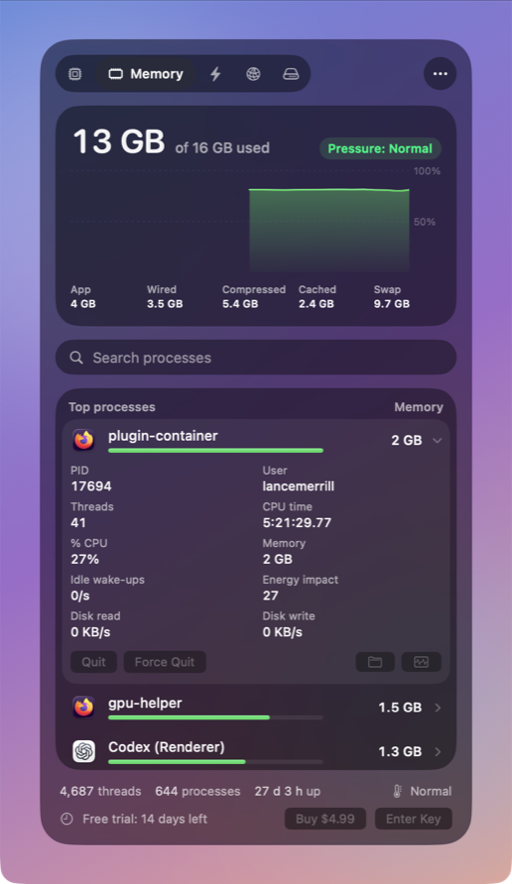
- An optional alert notifies you when memory pressure turns critical. Alerts are off until you turn them on.
- Click a process to see its memory, threads and CPU time, and to Quit or Force Quit it after a confirmation.
- Thrum's memory figures are calculated the way Activity Monitor calculates them.
Thrum is $4.99 once, with a 14-day free trial and no account. After the trial the menu bar graph and the popover keep working; Quit, Force Quit and alerts need a license. It requires macOS 26 Tahoe, on Apple silicon or Intel.
Questions
Is yellow memory pressure bad?
Not by itself. Yellow means macOS is compressing memory and may use swap. If it stays yellow and the Mac feels slow, quit the apps using the most memory.
Why is my Mac using all its memory with nothing open?
macOS fills spare memory with cached files to make things faster, and frees it when apps need it. Check the Memory Pressure graph instead: if it is green, memory is not the problem.
Does restarting a Mac fix memory pressure?
For a while. A restart clears everything, but pressure returns if you open the same apps. Finding the app that uses the most memory is the lasting fix.