 Thrum
What is "Swap Used" on a Mac?
Last checked: October 2026 on macOS 26 Tahoe.
"Swap Used" in Activity Monitor is the amount of memory macOS has moved out of RAM and onto the startup disk to make room for apps. Some swap is normal on any Mac that has been running for a while. It is only a problem when it keeps growing while the Memory Pressure graph is yellow or red, because reading memory back from disk is much slower than reading it from RAM.
Where to see Swap Used
- Open Activity Monitor (Applications > Utilities).
- Click Memory at the top of the window.
- Look at the bottom of the window: Swap Used is listed under Cached Files, next to the Memory Pressure graph.
In Terminal, this command shows the total swap space, how much is used and how much is free:
sysctl vm.swapusageThe swap itself lives in files named swapfile0, swapfile1 and so on in /System/Volumes/VM. macOS creates and removes them as needed; there is nothing to set up or clean up by hand.
How macOS decides to swap
When apps need more memory than is free, macOS frees it in steps, cheapest first:
- It drops cached files that are not being used.
- It compresses memory that apps have not touched recently (the Compressed figure on the Memory tab).
- When that is not enough, it writes some of that memory to disk. That is swap.
Swap is not cleared the moment memory frees up. Memory stays in swap until an app needs it again or quits, so Swap Used can stay at a few gigabytes long after the busy period has passed.
When a large Swap Used number matters
- Swap Used high, Memory Pressure green: fine. macOS swapped out memory nobody was using, and it has enough now.
- Swap Used growing, Memory Pressure yellow or red: the Mac is short of memory right now. Apps will pause while memory is read back from disk.
- Swap Used very large and the startup disk nearly full: macOS needs free disk space for swap files. Keep at least several gigabytes free on the startup disk.
See what memory pressure is for how to read the graph.
How to reduce swap use
- On the Memory tab, click the Memory column so the apps using the most are on top.
- Quit the apps you are not using, and close browser tabs and windows you do not need.
- If one app's memory keeps growing, quit and reopen it.
- Restart the Mac to clear swap completely. It comes back only if the same work needs more memory than the Mac has.
Does swapping wear out an SSD? Writing to swap does count toward the SSD's write total, so constant heavy swapping over years adds up. Normal, occasional swap is not a concern. The fix for constant swapping is the same as above: run less at once, or use a Mac with more memory.
These steps are the same in macOS 26 Tahoe, macOS 15 Sequoia and macOS 14 Sonoma.
Swap and memory in the menu bar with Thrum
Thrum's Memory tab shows memory pressure, app, wired, compressed and cached memory, and swap, with a 60-second graph and the eight processes using the most memory. The menu bar item can show memory used, turning yellow or red as memory pressure rises.
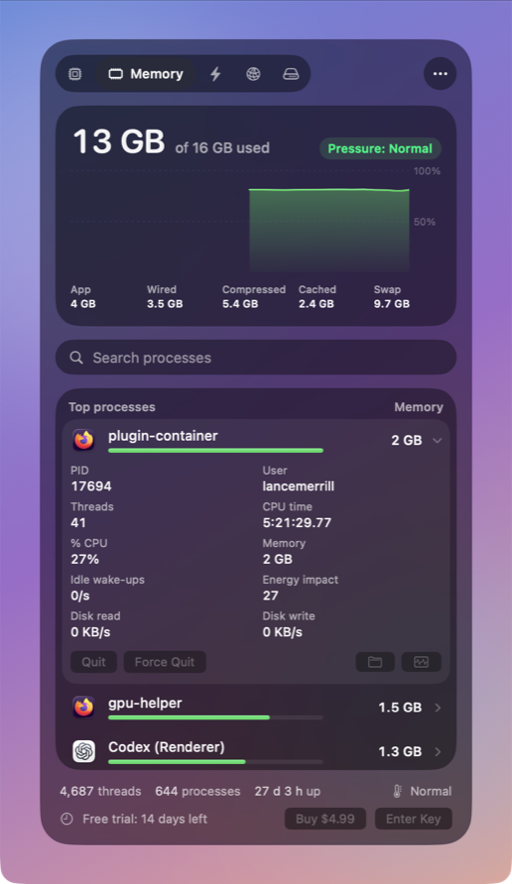
- An optional alert notifies you when memory pressure turns critical. Alerts are off until you turn them on.
- Click a process to see its memory, and to Quit or Force Quit it after a confirmation.
Thrum is $4.99 once, with a 14-day free trial and no account. After the trial the menu bar graph and the popover keep working; Quit, Force Quit and alerts need a license. It requires macOS 26 Tahoe, on Apple silicon or Intel.
Questions
Is it bad to have swap used on a Mac?
No. Some swap is normal. It matters when Swap Used keeps growing while the Memory Pressure graph in Activity Monitor is yellow or red.
Can I turn off swap on a Mac?
Not in a supported way. macOS manages swap itself. Reduce it by running fewer memory-heavy apps at once.
Why is Swap Used still high after I quit apps?
Memory stays in swap until something needs it. If memory pressure is green, the number is harmless; a restart clears it.