
Thrum
Thrum is an activity monitor for the Mac menu bar that shows a live CPU graph and, in one click, the processes using the most CPU, memory, energy, network and disk, with Quit and Force Quit.
$4.99 once. 14-day free trial, no account. Requires macOS 26 Tahoe.
What it does
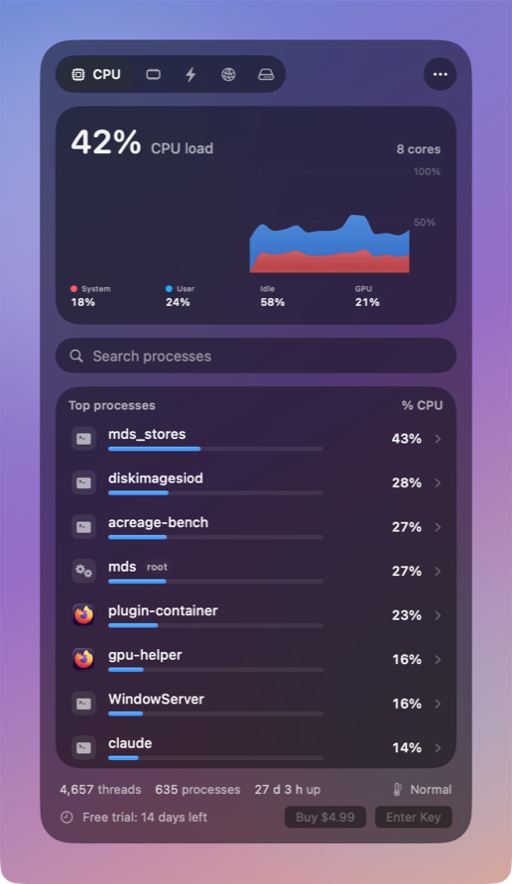
Thrum sits in the menu bar as a small live CPU graph. Click it for five tabs, each with a 60-second graph and the eight processes using the most.
A live graph in the menu bar
A CPU sparkline by default. Or CPU percentage, memory used, or CPU and memory bars. An optional second item shows upload and download speed.
CPU, Memory, Energy, Network, Disk
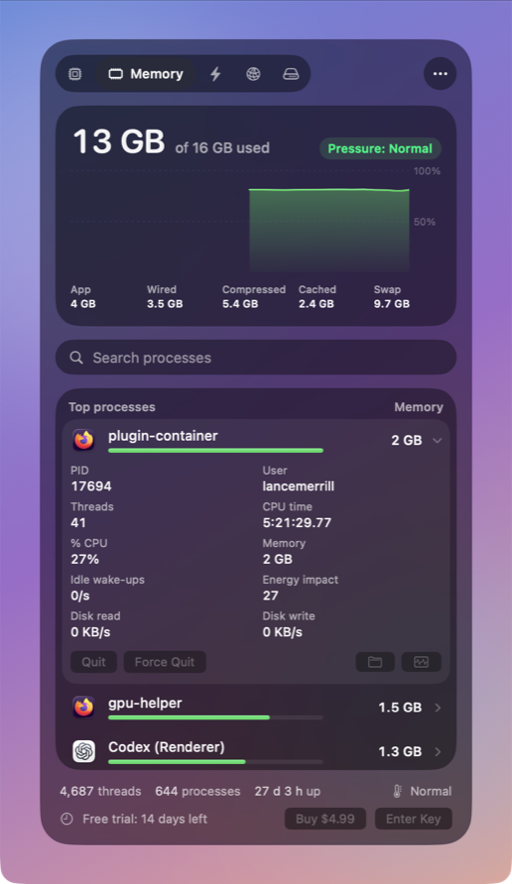
Each tab has a smooth 60-second graph. System, user and idle CPU plus GPU use; memory pressure, app, wired, compressed and cached memory, and swap.
Energy and battery
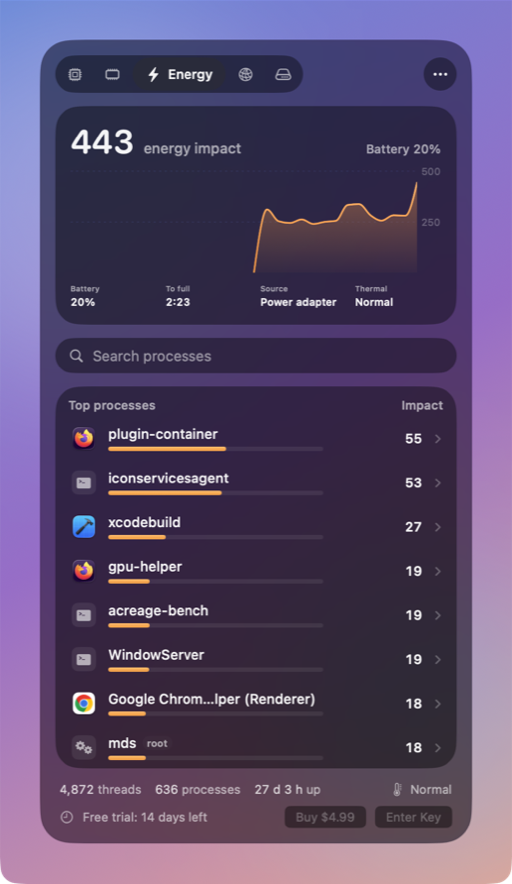
Energy impact per app, computed the way macOS does. Battery level, time remaining and power source.
Network and disk per app
Upload and download speed per app, and disk read and write for the whole Mac and per app.
The top 8, with app icons
Includes processes owned by root and other users. Tap one for its PID, user, threads, CPU time, idle wake-ups and memory. Search by name or PID.
Quit or Force Quit
With a confirmation first. System processes ask twice. Reveal in Finder and Open in Activity Monitor are one click away.
Alerts, if you want them
A notification when an app stays busy for a few minutes, or memory pressure gets high. Off until you turn them on.
Liquid Glass
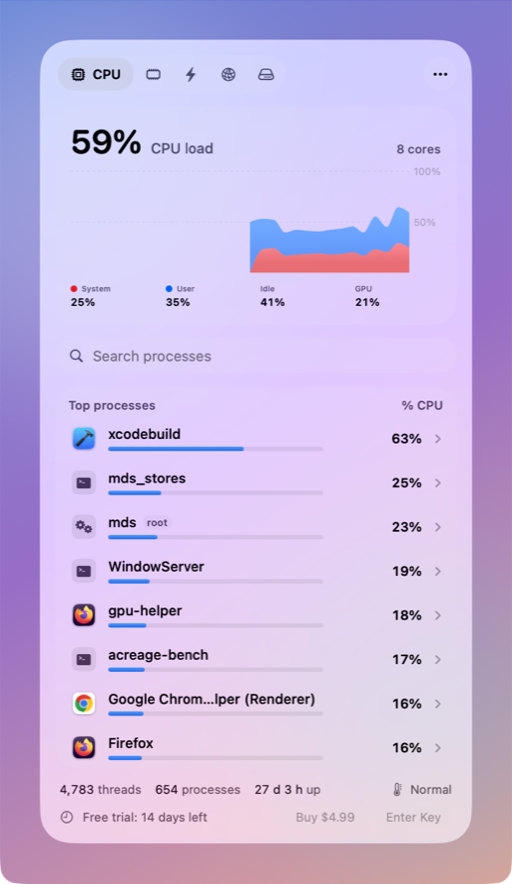
Built for macOS 26 with glass cards and controls. Light and dark, or follow the system. Threads, processes, uptime and thermal state in the footer.
Settings that stay out of the way
Update every 1, 2 or 5 seconds. Hide system processes. Open at login.


Find what is busy, and quit it
Click a process to see its PID, user, threads, CPU time, idle wake-ups and memory. Quit and Force Quit ask for confirmation first. System processes ask twice.
- Apps quit the normal way, so they can save their work.
- Force Quit stops a process at once.
- Reveal in Finder and Open in Activity Monitor sit next to them.
Screenshots
Taken from the app running on a MacBook Pro.
Light on your Mac
With the popover closed, Thrum reads a few system counters, never more often than every 2 seconds, and nothing else. The process list, graphs and per-app network reads run only while the popover is open. Measured on a MacBook Pro (M1 Pro, macOS 26.3) at the default 2-second interval:
CPU with the popover closed
CPU with the popover open
Memory with the popover closed
Pricing
Try everything free for 14 days. No account, no subscription.
After the trial, the menu bar graph and the popover keep working. Quit, Force Quit and alerts need a license key.
Once. One license key works on up to 3 Macs.
- All features, all future 1.x updates
- Sold through Stripe, which acts as merchant of record
- Refunds within 14 days: email support@tundra.industries
Questions
What do I need?
A Mac with macOS 26 Tahoe or later, Apple silicon or Intel. About 10 MB of disk space.
How do I enter my license key?
After you buy, the confirmation page and email show your key (it starts with THRM-). Click Thrum in the menu bar, then the ••• button, Settings, License. Paste the key and click Activate.
I lost my key.
Email support@tundra.industries from the address you paid with and we will send it again.
Does Thrum need an admin password or a helper?
No. It reads system counters as your user. For processes owned by other users, such as root, macOS shares their CPU time and memory through the built-in ps tool, which Thrum uses.
Can Thrum quit system processes?
Thrum asks twice before trying, and macOS usually refuses for processes owned by root. Thrum never offers to quit the kernel, launchd, WindowServer or loginwindow.
What data does Thrum send?
None about your Mac. It contacts license.tundra.industries to check a license key and dl.tundra.industries to look for updates. See the privacy policy.
How is Thrum different from Activity Monitor?
Activity Monitor lists every process but needs its window open, and it can only show a graph in the Dock. Thrum keeps a live graph in the menu bar and shows the eight busiest processes for CPU, memory, energy, network and disk in one click, with optional alerts when an app stays busy.
Is it on the Mac App Store?
No. Looking at other apps' processes and quitting them needs an app outside the App Store sandbox. Thrum is signed with a Developer ID and notarized by Apple.
How much does Thrum cost?
$4.99 once. One license key works on up to 3 Macs. Try everything free for 14 days; after the trial the menu bar graph and the popover keep working, and Quit, Force Quit and alerts need a license key. Refunds within 14 days: email support@tundra.industries.
Are updates included?
Yes, all future 1.x updates. Thrum checks for updates and installs them with your permission.
More answers on the support page.