 Thrum
What is kernel_task, and why is it using so much CPU?
Last checked: October 2026 on macOS 26 Tahoe.
kernel_task is the core of macOS itself, shown as a process in Activity Monitor. When it shows a high % CPU, the most common reason is that macOS is managing heat: it makes the CPU less available to other processes so the Mac cools down, and that held-back time is counted against kernel_task. The fix is to find what is making the Mac hot, not to stop kernel_task, which is not possible.
What kernel_task is
kernel_task always has process ID 0 and is owned by root. It stands for the macOS kernel: the part that schedules processes, manages memory, talks to drivers and moves data to and from disks and networks. Every Mac has it running from startup until shutdown. It cannot be quit or force quit.
Some kernel_task CPU and memory use is always normal. It typically uses more while the Mac is copying large files, using the network heavily, or handling many devices and displays.
Why kernel_task uses a lot of CPU
- Heat. Apple describes this as the main reason: when the CPU gets too hot, kernel_task makes the CPU less available to the processes using it heavily. This happens more on Intel Macs, in warm rooms, and with the vents blocked, for example on a bed or a soft surface.
- Another busy process. An app keeping the CPU busy makes the Mac hot, and kernel_task rises to compensate. The app is the real cause.
- Heavy input and output. Large file copies, backups, Spotlight indexing and fast network transfers make the kernel itself work harder.
- Charging under load. Charging a laptop while it is working hard adds heat.
What to check, in order
- Open Activity Monitor, click the CPU tab, choose View > All Processes, and sort by % CPU.
- Look below kernel_task. If an app is also using a lot of CPU, quit it (select it and click the Stop button in the toolbar). kernel_task usually drops within a minute or two as the Mac cools.
- Click the Disk and Network tabs. If a backup, sync or download is running, kernel_task's use will fall when it finishes.
- Give the Mac air: a hard, flat surface, vents clear, and out of direct sun.
- If kernel_task stays high when nothing else is busy and the Mac is cool, restart the Mac. If it continues after that, start up in safe mode to rule out login items and third-party extensions, or contact Apple Support.
These steps are the same in macOS 26 Tahoe, macOS 15 Sequoia and macOS 14 Sonoma.
kernel_task using a lot of memory
kernel_task's Memory figure includes memory that macOS needs for itself, much of it Wired Memory, which cannot be compressed or moved to disk. A few gigabytes is normal, and more on Macs with a lot of memory or with several displays attached. It is not something to fix unless memory pressure is high; see what memory pressure is.
Watch kernel_task and the rest with Thrum
Thrum keeps a live CPU graph in the menu bar and lists the eight processes using the most CPU, including processes owned by root such as kernel_task. That makes it easy to see whether kernel_task is rising on its own or because another app is keeping the CPU busy. The footer shows the Mac's thermal state, which macOS raises when it is limiting performance to manage heat.
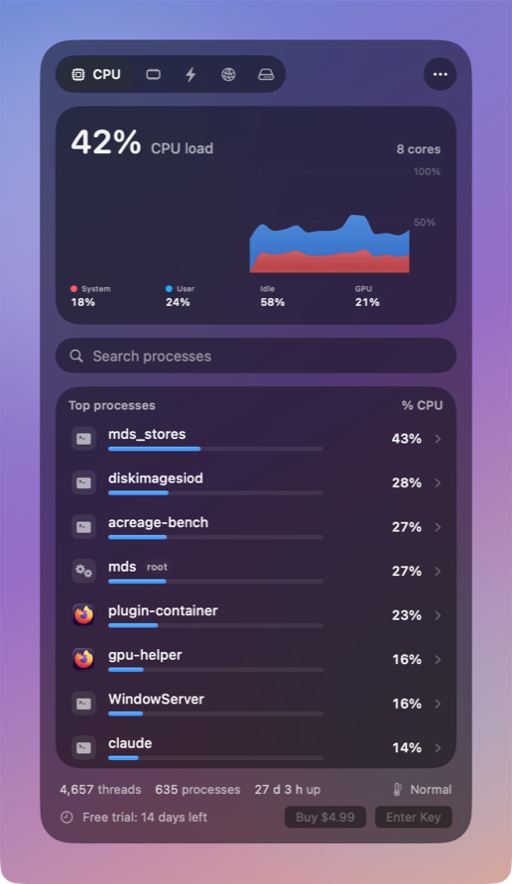
- Thrum never offers Quit for kernel_task, launchd, WindowServer or loginwindow.
- Click another busy process to Quit or Force Quit it after a confirmation. System processes ask twice.
- An optional alert notifies you when an app stays busy for a few minutes. Alerts are off until you turn them on.
Thrum is $4.99 once, with a 14-day free trial and no account. After the trial the menu bar graph and the popover keep working; Quit, Force Quit and alerts need a license. It requires macOS 26 Tahoe, on Apple silicon or Intel.
Questions
Can I quit kernel_task?
No. kernel_task is macOS itself. Reduce its CPU use by quitting busy apps and letting the Mac cool down.
Is kernel_task a virus?
No. Every Mac runs kernel_task with process ID 0. A process with that name and a different ID would be unusual.
Why is kernel_task high when the fans are quiet?
It may be handling heavy disk or network activity, such as a backup or a large download. Check the Disk and Network tabs in Activity Monitor.